
Run OpenCode in a Modal Sandbox
This example demonstrates how to run OpenCode remotely and connect to it from your local terminal or browser.
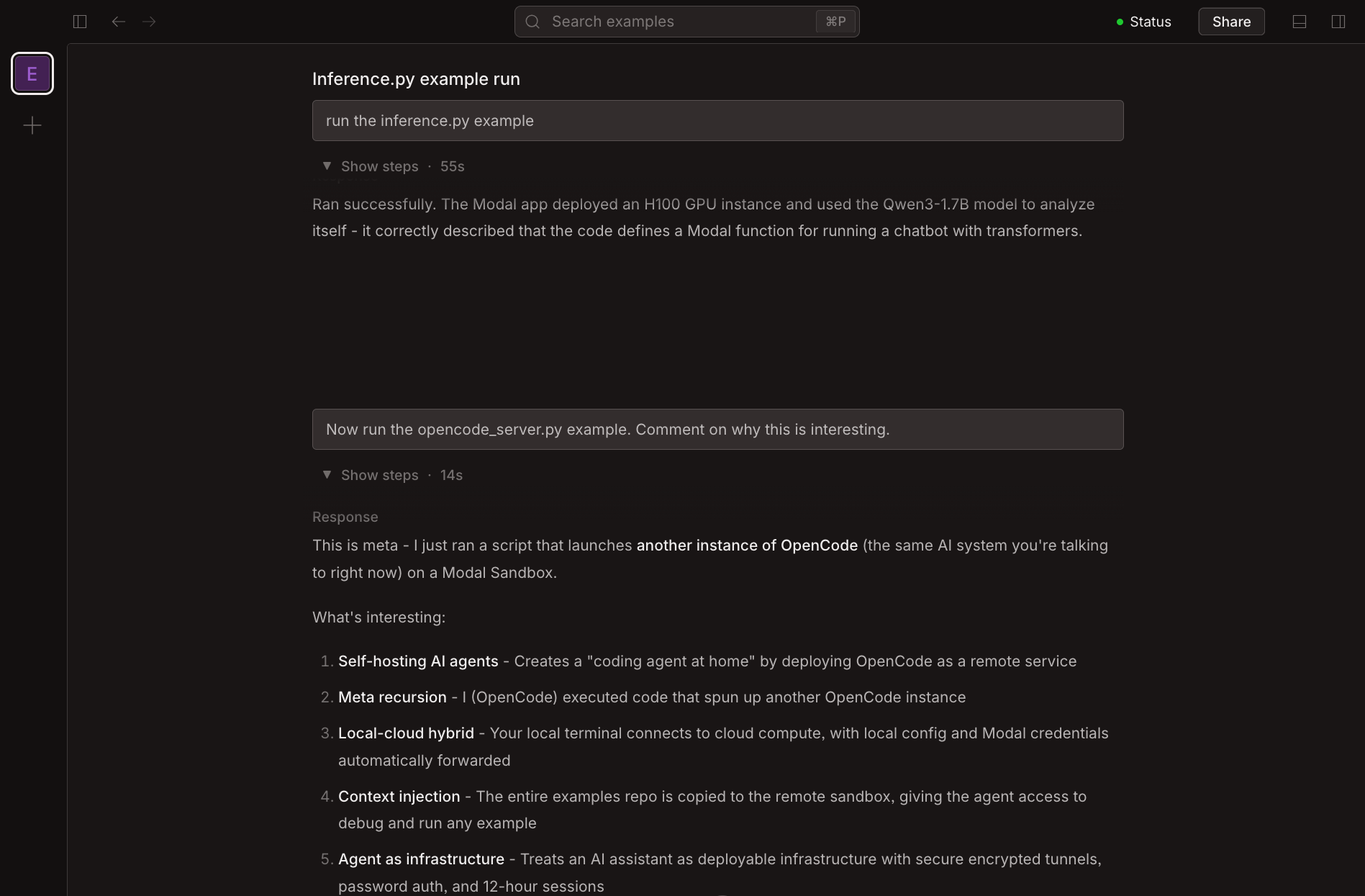
Combine self-hosted OpenCode with serving a big, smart model on Modal and you’ve got “coding agents at home”!
Coding agents are most useful when they have context and tools. By default, this script clones the Modal examples repo and gives the agent access to your Modal credentials, so it can run and debug examples (including this one!). Meta.
Set up OpenCode on Modal
import argparse
import os
from pathlib import Path

import modal

MINUTES = 60
HOURS = 60 * MINUTES
OPENCODE_PORT = 4096
DEFAULT_GITHUB_REPO = "modal-labs/modal-examples"
First, we define a Modal container Image with OpenCode installed.
def define_base_image() -> modal.Image:
    image = (
        modal.Image.debian_slim()
        .apt_install("curl", "git", "gh")
        .run_commands("curl -fsSL https://opencode.ai/install | bash")
        .env({"PATH": "/root/.opencode/bin:${PATH}"})
    )

    # We also bring the global default OpenCode configuration along for the ride.

    CONFIG_PATH = Path("~/.config/opencode/opencode.json").expanduser()
    if CONFIG_PATH.exists():
        print("🏖️  Including config from", CONFIG_PATH)
        image = image.add_local_file(
            CONFIG_PATH, "/root/.config/opencode/opencode.json", copy=True
        )

    return image
Clone a GitHub repository
Next, we clone the code we want the agent to work on. The repository is cloned into the container image at build time, so it’s available when the Sandbox starts.
def clone_github_repo(
    image: modal.Image, repo: str, ref: str, token: str | None = None
) -> modal.Image:
    git_config = "git config --global advice.detachedHead false"

    # For private repositories, pass a GitHub personal access token via `--github-token`.
    # For public repositories, no token is needed.

    if token:
        clone_cmd = f"GIT_ASKPASS=echo git clone --quiet --depth 1 --branch {ref} --no-single-branch https://oauth2:{token}@github.com/{repo}.git /root/code"
    else:
        clone_cmd = f"GIT_TERMINAL_PROMPT=0 git clone --quiet --depth 1 --branch {ref} --no-single-branch https://github.com/{repo}.git /root/code"

    print(f"🏖️  Cloning {repo}@{ref} to /root/code")
    return image.run_commands(git_config, clone_cmd, force_build=True)
Grant Modal credentials
Since the agent is working with Modal code, we also make it easy to provide Modal access.
Examples in this repo should run with nothing more than modal installed —
except for a few that use fastapi.
def add_modal_access(image: modal.Image) -> modal.Image:
    image = image.uv_pip_install("modal", "fastapi~=0.128.0")

    # We grant the agent our Modal permissions,
    # either via environment variables or the local credentials file.

    modal_token_id = os.environ.get("MODAL_TOKEN_ID")
    modal_token_secret = os.environ.get("MODAL_TOKEN_SECRET")

    if modal_token_id and modal_token_secret:
        return image.env(
            {"MODAL_TOKEN_ID": modal_token_id, "MODAL_TOKEN_SECRET": modal_token_secret}
        )

    MODAL_PATH = Path("~/.modal.toml").expanduser()
    if MODAL_PATH.exists():
        print("🏖️  Including Modal auth from", MODAL_PATH)
        return image.add_local_file(MODAL_PATH, "/root/.modal.toml", copy=True)

    raise EnvironmentError(
        "No Modal credentials found. "
        "Either set MODAL_TOKEN_ID and MODAL_TOKEN_SECRET environment variables, "
        "or ensure ~/.modal.toml exists."
    )
Start the Sandbox
Now, we create a Modal Sandbox to run our coding agent session. This Sandbox has our environment Image and a password for authentication.
We open up the OPENCODE_PORT so that the server can be accessed over the Internet.
def create_sandbox(
    image: modal.Image,
    timeout: int,
    app: modal.App,
    secrets: list[modal.Secret],
    working_dir: str | None = None,
) -> modal.Sandbox:
    print("🏖️  Creating sandbox")

    with modal.enable_output():
        return modal.Sandbox.create(
            "opencode",
            "serve",
            "--hostname=0.0.0.0",
            f"--port={OPENCODE_PORT}",
            "--log-level=DEBUG",
            "--print-logs",
            encrypted_ports=[OPENCODE_PORT],
            secrets=secrets,
            timeout=timeout,
            image=image,
            app=app,
            workdir=working_dir,
        )
OpenCode is truly open — there are many interfaces to the underlying coding agent server. Here we print information for:
- directly accessing the underlying Modal Sandbox for debugging or “pair coding” with the agent
- accessing the Web UI from a local browser (with authentication!)
- accessing the TUI from your local terminal
def print_access_info(sandbox: modal.Sandbox, password_secret_name: str):
    print(
        "🏖️  Access the sandbox directly:",
        f"modal shell {sandbox.object_id}",
        sep="\n\t",
    )

    tunnel = sandbox.tunnels()[OPENCODE_PORT]
    print(
        "🏖️  Access the WebUI:",
        tunnel.url,
        "Username: opencode",
        sep="\n\t",
    )
    print(
        "🏖️  Access the TUI:",
        f"OPENCODE_SERVER_PASSWORD=YOUR_PASSWORD opencode attach {tunnel.url}",
        sep="\n\t",
    )
    print(
        "🏖️  Display the password:",
        f"modal shell --secret {password_secret_name} --cmd 'env | grep OPENCODE_SERVER_PASSWORD='",
        sep="\n\t",
    )
The server is secured via a password in a Modal Secret.
You can create one by heading to the Secrets Dashboard and creating a new “Custom” Secret. Use OPENCODE_SERVER_PASSWORD as the key
and the password as the value.
The CLI will also give you a helpful one-liner you can use to recover the password with your Modal credentials in case you forget it.
Putting it all together
def main(
    timeout: int,
    app_name: str,
    allow_modal_access: bool,
    github_repo: str,
    github_ref: str,
    github_token: str | None,
    password_secret_name: str,
):
    app = modal.App.lookup(app_name, create_if_missing=True)
    image = define_base_image()

    if allow_modal_access:
        image = add_modal_access(image)

    image = clone_github_repo(image, github_repo, github_ref, github_token)

    password_secret = modal.Secret.from_name(password_secret_name)

    sandbox_secrets = [password_secret]
    if github_token:
        sandbox_secrets.append(modal.Secret.from_dict({"GH_TOKEN": github_token}))

    sandbox = create_sandbox(image, timeout, app, sandbox_secrets, "/root/code")
    print_access_info(sandbox, password_secret_name)
Command-line options
This script supports configuration via command-line arguments.
Run with --help to see all options.
To grant the agent the same GitHub permissions you have, you can pass a GitHub personal access token.
If you use the gh CLI, you can use shell command substitution to pass your current auth:
python 13_sandboxes/opencode_server.py --github-token $(gh auth token)def parse_timeout(timeout_str: str) -> int:
if timeout_str.endswith("h"):
minutes = int(timeout_str[:-1]) * 60
elif timeout_str.endswith("m"):
minutes = int(timeout_str[:-1])
else:
minutes = int(timeout_str) * 60
if minutes < 1:
raise argparse.ArgumentTypeError("Timeout must be at least 1 minute")
if minutes > 24 * 60:
raise argparse.ArgumentTypeError("Timeout cannot exceed 24 hours")
return minutes * MINUTES
if __name__ == "__main__":
parser = argparse.ArgumentParser(description="Launch OpenCode server on Modal")
parser.add_argument(
"--timeout",
type=str,
default="12",
help="Server timeout (e.g. 2h, 90m). No suffix -> hours. Default: 12",
)
parser.add_argument(
"--app-name",
type=str,
default="example-opencode-server",
help="Modal app name. Default: example-opencode-server",
)
parser.add_argument(
"--no-modal-access",
action="store_false",
dest="allow_modal_access",
help="Disable Modal credential access",
)
parser.add_argument(
"--password-secret",
dest="password_secret_name",
help="Name",
default="opencode-secret",
)
parser.add_argument(
"--github-repo",
type=str,
default=DEFAULT_GITHUB_REPO,
help=f"GitHub repo in owner/repo format. Default: {DEFAULT_GITHUB_REPO}",
)
parser.add_argument(
"--github-ref",
type=str,
default="main",
help="Git ref to checkout (branch, tag, SHA). Default: main",
)
parser.add_argument(
"--github-token",
type=str,
default=None,
help="GitHub PAT for private repos and gh CLI auth. Tip: use $(gh auth token)",
)
args = parser.parse_args()
main(
parse_timeout(args.timeout),
args.app_name,
args.allow_modal_access,
args.github_repo,
args.github_ref,
args.github_token,
args.password_secret_name,
)