
Sandbox resources and pricing
This page covers resource configuration and pricing for Modal Sandboxes. For general documentation on CPU and memory options, see Reserving CPU and memory.
Modal Sandboxes differ from many other sandbox providers on two dimensions:
- Modal Sandboxes have elastic resourcing. They automatically “burst” beyond their CPU and memory requests.
- You’re charged
max(request, actual)for both CPU and memory. When bursting, chargingmax(request, actual)means you only pay for active-resources.
See Billing in the resource guide for more details.
Pay for what you use
By default, each Sandbox requests 0.125 CPU cores and 128 MiB of memory and can burst beyond that when the host has spare capacity.
Modal schedules and packs Sandboxes onto hosts so that additional CPU and memory is available the vast majority of the time. Because Sandboxes can reliably burst to use additional resources, most workloads don’t need to set a resource request for their Sandboxes.
Not setting a resource request means you only pay for the resources your Sandbox is actively using each second, with the small default request as the minimum.
Set a resource request if your Sandboxes need guaranteed CPU or memory and a resource limit if you need to cap how much they can burst.
Setting resource requests
Requesting resources guarantees your Sandbox a minimum amount of CPU and memory. You are charged for requested resources for the lifetime of your Sandbox, regardless of whether the resources are being used.
Set CPU and memory requests using the cpu and memory parameters when creating your Sandbox.
The cpu parameter specifies physical CPU cores (1 core = 2 vCPUs),
and memory specifies MiB:
import modal

app = modal.App.lookup("my-app", create_if_missing=True)

sb = modal.Sandbox.create(
    cpu=0.5,
    memory=512,
    app=app,
)
import { ModalClient } from "modal";
const modal = new ModalClient();
const app = await modal.apps.fromName("my-app", { createIfMissing: true });
const image = modal.images.fromRegistry("python:3.13-slim");
const sb = await modal.sandboxes.create(app, image, {
cpu: 0.5,
memoryMiB: 512,
});package main
import (
"context"
modal "github.com/modal-labs/modal-client/go"
)
func main() {
ctx := context.Background()
mc, _ := modal.NewClient()
app, _ := mc.Apps.FromName(ctx, "my-app", &modal.AppFromNameParams{
CreateIfMissing: true,
})
image := mc.Images.FromRegistry("python:3.13-slim", nil)
sb, _ := mc.Sandboxes.Create(ctx, app, image, &modal.SandboxCreateParams{
CPU: 0.5,
MemoryMiB: 512,
})
}For details on default values and maximum limits, see Reserving CPU and memory.
Setting resource limits
You can set upper limits to cap how much a Sandbox can burst. Limits are particularly useful when an AI agent controls what runs inside the Sandbox, as they prevent misbehaving or adversarial workloads from consuming unbounded resources. They also let you evaluate agents on bounded resources, like when running evals.
sb = modal.Sandbox.create(
    cpu=(0.5, 4.0),       # Request 0.5 cores, limit to 4 cores
    memory=(512, 2048),   # Request 512 MiB, limit to 2048 MiB
    app=app,
)
const sb = await modal.sandboxes.create(app, image, {
cpu: 0.5,
cpuLimit: 4.0,
memoryMiB: 512,
memoryLimitMiB: 2048,
});sb, _ := mc.Sandboxes.Create(ctx, app, image, &modal.SandboxCreateParams{
CPU: 0.5, // Request 0.5 cores
CPULimit: 4.0, // Limit to 4 cores
MemoryMiB: 512, // Request 512 MiB
MemoryLimitMiB: 2048, // Limit to 2048 MiB
})See Resource limits for details on how CPU and memory limits behave.
Tuning your requests
The Sandboxes tab on an App page has metrics to help you monitor your bursting and, if needed, find the right request size: CPU Per Sandbox, Memory Per Sandbox, CPU Pressure Per Sandbox, and Exit Reasons.
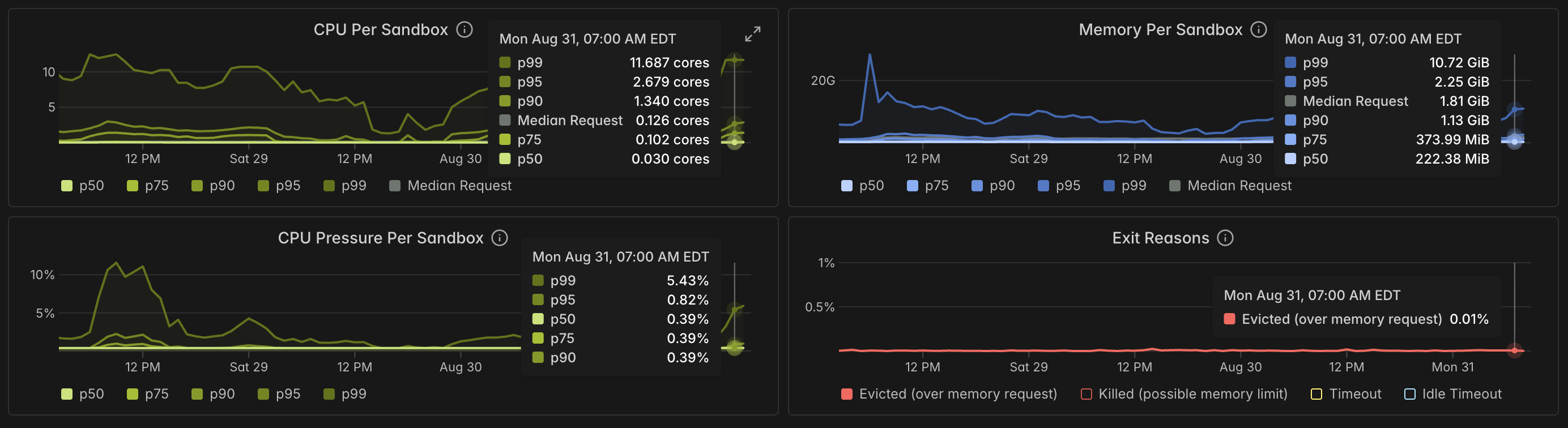
CPU Per Sandbox and Memory Per Sandbox show percentiles of how much CPU and memory your Sandboxes actually use. And CPU Pressure Per Sandbox and Exit Reasons tell you if a request is too low. CPU Pressure Per Sandbox tracks time Sandboxes spent stalled waiting for CPU; Exit Reasons tracks Sandboxes evicted while exceeding their memory request.
Start with the default request values for CPU and memory, which are used when you omit the
cpuandmemoryparameters.Run your typical workload and check CPU Per Sandbox and Memory Per Sandbox to see your actual usage.
Check CPU Pressure Per Sandbox and Exit Reasons to confirm that throttling and evictions are at acceptable levels.
If evictions are higher than needed, raise the resource request based on your observed usage.
Disk
Sandboxes have the same disk limits as other Modal containers, and their disk size cannot be increased. On the VM runtime, the root filesystem is a fixed 512 GiB.
GPU Sandboxes
You can also run Sandboxes with GPUs. See GPU acceleration for available
GPU types and configuration. GPU Sandboxes are only supported with runtime="gvisor".
Unlike CPU Sandboxes, GPU Sandboxes are subject to preemption. Design your GPU workloads to handle interruptions gracefully.
Additional resources
- Sandbox pricing: current pricing for Sandboxes
- Reserving CPU and memory: CPU, memory, and disk configuration
- Billing: billing cycles, budgets, and cost attribution