





Update 2026-04-07: Today, Z.ai released GLM-5.1, once again setting the state-of-the-art for open weights intelligence. Our free endpoint has been upgraded to serve this new version.
Today Z.ai released GLM-5, a frontier open weights foundation language model designed for long-horizon agents and systems engineering.
The Modal Research team partnered with Z.ai ahead of public launch so we could test drive the model on our infrastructure. It’s delightful, smart, and fast. Internally, we’ve added it to our favorite AI frontends: the Vercel AI SDK, Claude Code, OpenCode, and OpenClaw.
And now you can too: try it for free!
Why does this matter?
In case you missed it, software engineers have officially been automated out of the job; we are all prompt engineers now.
Well, not exactly. But there has been a vibe shift in vibe coding in the last two months, as serious, taste-making senior engineers from Linus Torvalds (Linux) to dhh (Ruby on Rails) have increasingly embraced coding with agents. Even George Hotz called agentic coding “decent”.
The missing piece was model quality. Each new generation of frontier models supports a new and more ambitious application, from early tab-completion with GPT-3 models (RIP to code-davinci-002) to copiloting chat assistants with GPT-3.5/Claude 2 to simple app development with GPT-4/Claude 3. Now, with Claude Opus 4.6 and GPT 5.3 Codex, the frontier supports long-horizon tasks, like the development and improvement of complex systems. If you don’t believe us, just ask your terminally online friend who won’t shut up about Claude Code and ClawdeBot moltbot OpenClaw.
As before, this new application domain was pioneered by proprietary models — models whose weights are not available under an Open Source Initiative-approved license, like MIT or Apache. But since DeepSeek’s epoch-making launch of DeepSeek-R1, open models have not been far behind. Now, GLM-5 matches the performance of proprietary models released in the last month and is available under the MIT license.
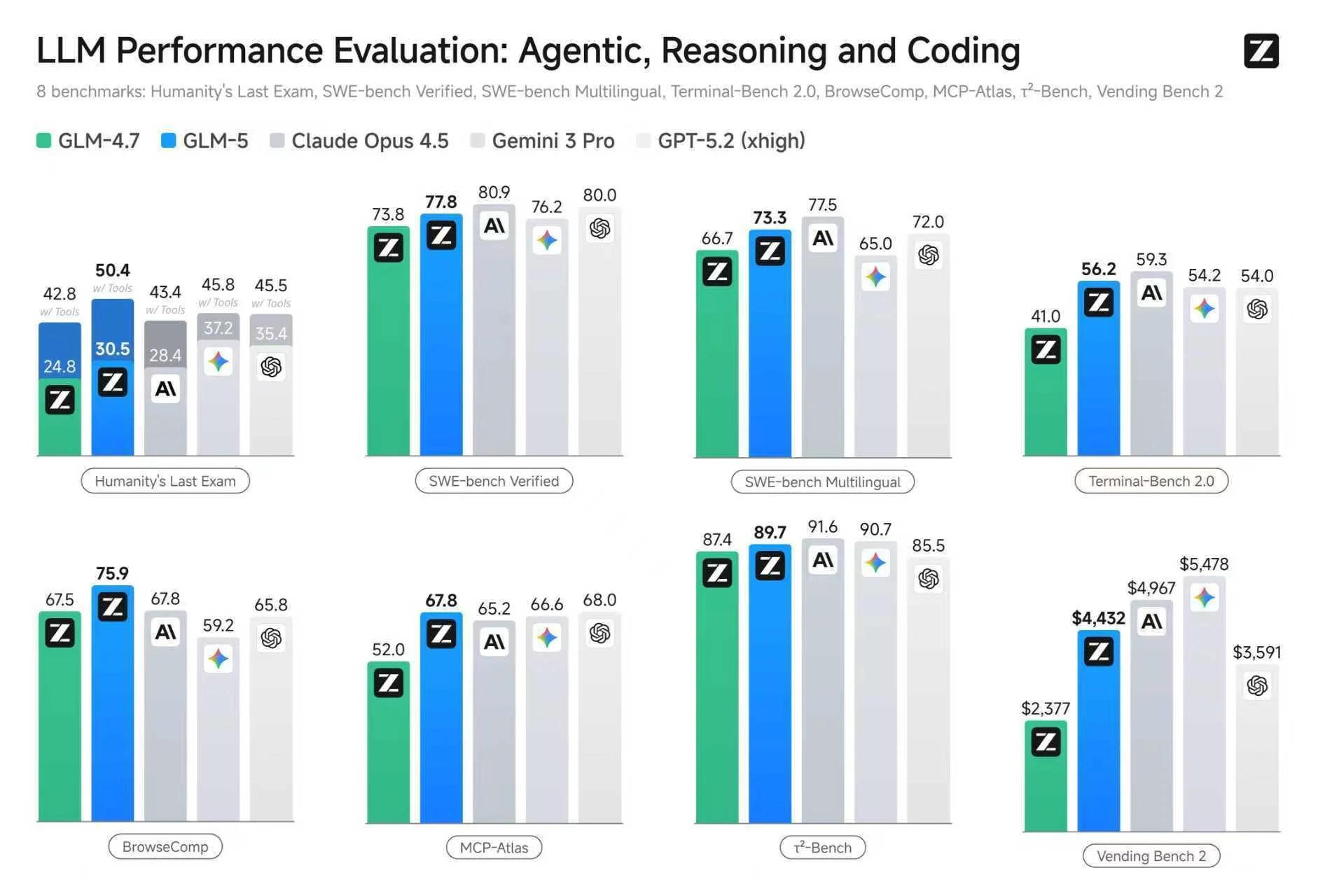
For details on the above benchmarks and more, see Z.ai’s blog post.
How do I run GLM-5?
We’ve written in depth about the performance profile of LLM inference, but we walk through the core considerations for GLM-5 quickly here. In eight bit floating point precision, GLM-5 weighs in at about 700 GB. That’s larger than the HBM of any single GPU on the market, so it must be deployed onto multiple GPUs to avoid tanking performance. Like most large models, it uses mixture-of-experts (MoE) sparsity in the matrix multiplications of its MLP blocks to reduce demand on memory bandwidth. A variant of DeepSeek Sparse Attention controls the punishing quadratic scaling with sequence length of the attention mechanism by quickly filtering out all but a few thousand past tokens with a lightweight, data-dependent filtering layer (”indexer”). We’ve landed on running it with tensor parallelism in the MoE layers (using DeepSeek’s DeepGemm kernels) and data parallelism in the attention layers (using DeepSeek’s FlashMLA kernels).
With high quality open source inference engines like vLLM and SGLang, any engineer with access to the right hardware can host this model themselves and support long-horizon agents and systems engineering tasks with excellent per-user latency. We’ve been running the model internally with interactivities between 30 and 75 tokens per second per user (depending on replica load and speculator hit rate).
At time of writing, getting GLM-5 to run involves a few patches, which we document with reproducible deployment code here. That code deploys GLM-5 with SGLang on a single node of eight B200s on our cloud platform. We expect fast follows to stabilize support and to improve performance, including integrating our work on inference-optimized paths for Flash Attention 4.
How do I use GLM-5?
To support everyone who wants to take GLM-5 for a spin, we’re releasing an endpoint you can connect to your favorite AI frontend. And it’s free! From now until the end of April. You can generate a credential and get started here.
Usage is limited to a single concurrent request. There are no direct limits on tokens — requests are what really matter! We find this maps nicely onto “personal use” of a coding agent: one or a few active client threads, each possibly spanning many thousands of tokens.
It's the first time we're releasing an endpoint in addition to sample self-deployment code. More to come on this front from the Modal Research team.
Have a production use case in mind? Contact sales@modal.com to discuss higher rate limits or for guidance on deploying your own GLM-5 endpoint on Modal.
Below, we document how to integrate our GLM-5 endpoint with a variety of frontend frameworks. We’re running an OpenAI API-compatible server, so the integration path will in general go through your framework’s support for that API.
How do I use GLM-5 with OpenCode?
We really like the OpenCode coding agent framework. It’s easily configurable, widely compatible with other tooling, and highly extensible.
Once you create a token for the Modal GLM-5 endpoint, you just need to add Modal as a provider in an opencode.json configuration file, like in the sample below. You can find docs here.
{
    "$schema": "https://opencode.ai/config.json",
    "provider": {
        "modal": {
            "npm": "@ai-sdk/openai-compatible",
            "name": "Modal",
            "options": {
                "baseURL": "https://api.us-west-2.modal.direct/v1",
                "apiKey": "{env:LLM_BACKEND_API_KEY}"  # or copy-paste directly
            },
            "models": {
                "zai-org/GLM-5-FP8": {
                    "name": "GLM-5"
                }
            }
        }
    },
    "model": "modal/zai-org/GLM-5-FP8"
}
If you want to scale up your OpenCode agents, try deploying them onto a Modal Sandbox. You keep the HTTP API and the easy web and terminal UIs, but you gain ultra-fast autoscaling cloud infrastructure. That’s why Ramp built their Inspect background coding agent with OpenCode on Modal Sandboxes.
How do I use GLM-5 with OpenClaw?
The hottest agent framework on the block right now is OpenClaw, which promiscuously integrates LLM APIs with tools, knowledge sources, and skills. If you thought --dangerously-skip-permissions was spooky, you ain’t seen nothing yet!
OpenClaw supports OpenAI API-compatible providers through the openai-completions setting of the api key of a model provider defined in openclaw.json.
Copy the modal key and value from the snippet below, add it to your openclaw.json, and then launch an OpenClaw server with your token in the environment under LLM_BACKEND_API_KEY. Or just paste this into your OpenClaw UI and ask the agent to figure it out; that’s closer to the spirit.
{
    "models": {
        "mode": "merge",
        "providers": {
            "modal": {
                "baseUrl": "https://api.us-west-2.modal.direct/v1",
                "apiKey": "${LLM_BACKEND_API_KEY}",
                "api": "openai-completions",
                "models": [
                    {
                        "id": "zai-org/GLM-5-FP8",
                        "name": "GLM-5",
                        "reasoning": true,
                        "input": [
                            "text"
                        ],
                        "cost": {
                            "input": 0,
                            "output": 0,
                            "cacheRead": 0,
                            "cacheWrite": 0
                        },
                        "contextWindow": 192000,
                        "maxTokens": 8192
                    }
                ]
            }
        }
    }
}
How do I use GLM-5 with Claude Code?
Claude Code is not as open as other frontend agent frameworks. It is tightly integrated with Anthropic’s proprietary backend offerings.
However, you can use a LiteLLM gateway to proxy between a Claude Code client and an OpenAI API-compatible endpoint like ours. We demonstrate how to deploy a such a proxy on Modal here.
How do I use GLM-5 with the Vercel AI SDK?
The Vercel AI SDK is a key library for JavaScript applications of LLM APIs. For instance, OpenCode supports OpenAI-compatible APIs by delegating to the Vercel AI SDK.
After you’ve created a token for the Modal GLM-5 endpoint, you can provide it as an apiKey when creating an OpenAICompatible provider.
const provider = createOpenAICompatible({
  name: "modal-glm-5",
  baseURL:
    process.env.LLM_BACKEND_URL || "hhttps://api.us-west-2.modal.direct/v1",
  apiKey: process.env.LLM_BACKEND_API_KEY ?? "",
});
You’ll also need to include the model name when creating a chatModel:
const result = streamText({
    model: provider.chatModel("zai-org/GLM-5-FP8"),
    ...
});
Like any good full-stack JavaScript framework, the Vercel AI SDK has two components: a Core library for logic and a UI library for frontends.
You can find a minimal integration of a Modal-hosted LLM with the Vercel AI SDK Core here. We like to use this when fiddling with our LLM backends, since you retain a lot of control and observability while still developing against an interface that’s used in harder-to-debug applications like TUIs.
You can find a more fulsome integration of a Modal-hosted LLM with the AI SDK’s UI elements in this sample React application.