Last week, NVIDIA hand-delivered Modal’s first Vera CPU server to our SF office. It’s now purring away in a server rack, and we’re pretty excited about what it could mean for Modal Sandboxes and, consequently, Modal users.
Vera is NVIDIA’s new Arm-compatible CPU, built for the Vera Rubin GPU platform but also available as a standalone CPU server.
Supporting Arm would be a huge change for Modal, coming from a long history exclusively running x86 machines. We’d need to make changes across our infrastructure and image build system to support an entirely different CPU architecture, but the benchmarks are impressive: a 2x increase on throughput. With this, the NVIDIA Vera CPU becomes an incredibly compelling option for powering Modal Sandboxes.
Why Vera could be a big deal for Modal Firstly, multi-tenant clusters are noisy.
Orchestration for a Sandbox product means running hundreds of concurrent containers and VMs on each cloud host. Unlike normal Kubernetes server deployments colocating pods on the same host, the shape of each sandbox workload is unique, and it leads to some interesting dynamics within a multi-tenant cluster:
Resource usage can be extremely spiky. A sandbox could spend most of its uptime relatively inactive, waiting on an LLM, with sudden and unpredictable CPU surges 10x above baseline, due to an npm install or expensive grep command. Workload shapes are not statically known. An LLM could throw anything into the sandbox, and the shape of that is only known at runtime. Resource sizing is often just a guess. All of these heterogeneous workloads jam together into a single homogeneous pool of compute, which can lead to noisy neighbor issues. One tenant’s performance can be impacted by another’s behavior. As a result of this, it’s incredibly difficult for users to know how to size their workloads, and for Modal to schedule them without contention.
Unlike other providers that force users to choose fixed reservations for max usage, Modal Sandboxes support bursting , which allows users to reserve guaranteed capacity for their P50 usage, rather than the worst-case P100 npm install moment, and trust when the transient spike comes along it’d be absorbed by the padding within the host node.
It’s a great strategy, and we’ve saved users millions of dollars teaching them to trust burstability, but it increases exposure to noisy neighbor issues otherwise avoided by strict limits.
Secondly, every second of CPU time costs more than just that CPU.
Sandboxes are usually run to augment some external process, and that process bottlenecking on the CPU leads to real dollars spent.
At Modal, we see two prevalent use cases: background agents and reinforcement learning rollouts.
For background agents, such as Ramp Inspect or those running on Niteshift, faster agents mean faster answers, which means higher revenue and user retention. It also means lower CPU time, driving down COGS. For reinforcement learning, there are GPUs sitting idle while sandboxed processes run. Most training setups are still synchronous, and an entire fanout of rollouts must complete before the GPU system can move forward to the next step. Any time saved on CPU is time saved on GPU. Benchmarking the Vera CPU To test Vera, we built a set of representative workloads and benchmarks for agentic Sandboxes.
Creating an “agentic” benchmark is a challenging task, given most of the work done on the servers is not CPU bound, and there’s no specific dimension we’d want to optimize for. Where a DB workload could optimize for disk I/O and an image processing workload could optimize SIMD, for sandboxes we needed to come up with a simulator that is both concurrent and heterogeneous: a big ol’ bag of chaos we could throw at the CPU.
From this we developed Agentless Agent Bench , a collection of 50 Terminal-Bench oracle solutions and verifiers, stripped of all network calls and prewarmed in concurrent Docker containers, isolating just the tasks actually performed on the CPU by agents and RL - compilation, file grepping, git operations, device emulation, and more.
Running the benchmark shows us both linear task completion time, and concurrent throughput metrics.
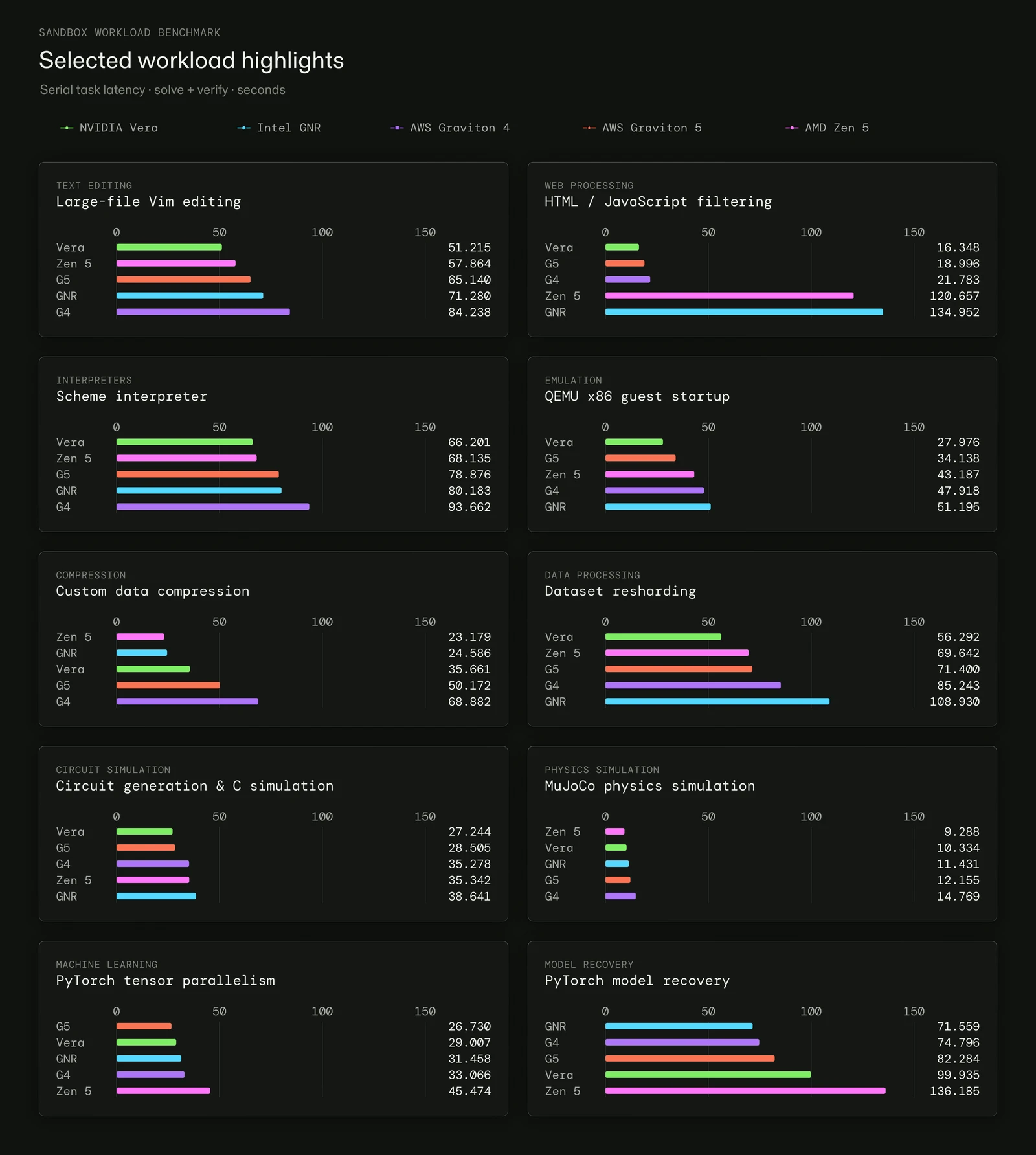
Below are results showing per-task latency for a selection of Terminal-Bench tasks you’d reasonably see an agent running in your sandboxes. This experiment was run on a machine without load, serially, so the results show pure straightline latency.
Seeing these results first, I was admittedly skeptical. Across the 50 tasks we benchmarked, Vera often performed better than the other CPUs, but not always, and not by a particularly large margin.
But straightline latency on a quiet host isn’t what Sandbox users experience. In practice, hundreds of workloads are competing for resources at once. Moving onward to testing under load, we get an entirely different story for Vera.
The false tradeoff In most systems, throughput and latency are a tradeoff.
Latency can be defined as the time that elapses from the start to the end of a task. Throughput is the quantity of completed tasks per unit time. This tests the host system’s ability to concurrently interleave processes and make progress on them all simultaneously. The more densely you pack tasks, the higher the throughput. But once the CPU becomes fully utilized, individual task latency suffers due to contention.
In terms of the Modal scheduler, it’s always tempting for us to run at a higher packing density, to squeeze more juice out of the host machines we have, and to offer a higher absolute scale that users can reach. But just as workloads are spiky within their containers, the absolute scale of the containers in our cluster is also spiky, which leaves us at the risk of overpacking host machines.
Usually, overpacking is felt as increased latency by the user.
But we’ve found this isn’t the case for Vera.
Vera gets better under heavy load Agentless Agent Bench has a test for throughput, in which it increases the count of concurrent containers running on the machine, looping as many task completions as possible in a fixed time.
Counterintuitively, Vera gets better under heavy load.
Task completion under contention
An animated chart cycles through 50, 100 and 150 concurrent containers every 2.5 seconds. Vera, AMD Zen 5 and Intel GNR use solid lines. Graviton 4, Graviton 5 and Intel GNR VM use dotted lines. Both GNR curves are cyan. All views share axes spanning 1–192 logical CPUs and 0–7,000 verified completions per 60 seconds. Manual selections pause cycling; the playback button resumes it.
SANDBOX WORKLOAD BENCHMARK
Task completion under contention
50 TerminalBench tasks stripped of network calls
Logical CPUs allowed by cpuset 0 1k 2k 3k 4k 5k 6k 7k 1 32 64 96 128 160 192 88 96 128 AWS Graviton 4 (vm): 1 logical CPUs, 73 completions / 60 s AWS Graviton 4 (vm): 2 logical CPUs, 146 completions / 60 s AWS Graviton 4 (vm): 3 logical CPUs, 209 completions / 60 s AWS Graviton 4 (vm): 4 logical CPUs, 265 completions / 60 s AWS Graviton 4 (vm): 5 logical CPUs, 315 completions / 60 s AWS Graviton 4 (vm): 6 logical CPUs, 345 completions / 60 s AWS Graviton 4 (vm): 7 logical CPUs, 381 completions / 60 s AWS Graviton 4 (vm): 8 logical CPUs, 411 completions / 60 s AWS Graviton 4 (vm): 10 logical CPUs, 475 completions / 60 s AWS Graviton 4 (vm): 12 logical CPUs, 519 completions / 60 s AWS Graviton 4 (vm): 14 logical CPUs, 595 completions / 60 s AWS Graviton 4 (vm): 16 logical CPUs, 693 completions / 60 s AWS Graviton 4 (vm): 20 logical CPUs, 866 completions / 60 s AWS Graviton 4 (vm): 26 logical CPUs, 1,208 completions / 60 s AWS Graviton 4 (vm): 32 logical CPUs, 1,513 completions / 60 s AWS Graviton 4 (vm): 40 logical CPUs, 1,930 completions / 60 s AWS Graviton 4 (vm): 50 logical CPUs, 2,381 completions / 60 s AWS Graviton 4 (vm): 63 logical CPUs, 2,503 completions / 60 s AWS Graviton 4 (vm): 79 logical CPUs, 2,889 completions / 60 s AWS Graviton 4 (vm): 96 logical CPUs, 2,940 completions / 60 s AWS Graviton 5 (vm): 1 logical CPUs, 91 completions / 60 s AWS Graviton 5 (vm): 2 logical CPUs, 176 completions / 60 s AWS Graviton 5 (vm): 3 logical CPUs, 260 completions / 60 s AWS Graviton 5 (vm): 4 logical CPUs, 320 completions / 60 s AWS Graviton 5 (vm): 5 logical CPUs, 371 completions / 60 s AWS Graviton 5 (vm): 6 logical CPUs, 400 completions / 60 s AWS Graviton 5 (vm): 7 logical CPUs, 451 completions / 60 s AWS Graviton 5 (vm): 8 logical CPUs, 490 completions / 60 s AWS Graviton 5 (vm): 10 logical CPUs, 557 completions / 60 s AWS Graviton 5 (vm): 12 logical CPUs, 627 completions / 60 s AWS Graviton 5 (vm): 14 logical CPUs, 713 completions / 60 s AWS Graviton 5 (vm): 16 logical CPUs, 817 completions / 60 s AWS Graviton 5 (vm): 20 logical CPUs, 1,035 completions / 60 s AWS Graviton 5 (vm): 26 logical CPUs, 1,445 completions / 60 s AWS Graviton 5 (vm): 32 logical CPUs, 1,805 completions / 60 s AWS Graviton 5 (vm): 40 logical CPUs, 2,299 completions / 60 s AWS Graviton 5 (vm): 50 logical CPUs, 2,631 completions / 60 s AWS Graviton 5 (vm): 63 logical CPUs, 2,855 completions / 60 s AWS Graviton 5 (vm): 79 logical CPUs, 3,468 completions / 60 s AWS Graviton 5 (vm): 96 logical CPUs, 3,474 completions / 60 s AMD Zen 5: 1 logical CPUs, 59 completions / 60 s AMD Zen 5: 2 logical CPUs, 129 completions / 60 s AMD Zen 5: 3 logical CPUs, 203 completions / 60 s AMD Zen 5: 4 logical CPUs, 279 completions / 60 s AMD Zen 5: 5 logical CPUs, 343 completions / 60 s AMD Zen 5: 6 logical CPUs, 409 completions / 60 s AMD Zen 5: 7 logical CPUs, 478 completions / 60 s AMD Zen 5: 8 logical CPUs, 537 completions / 60 s AMD Zen 5: 10 logical CPUs, 669 completions / 60 s AMD Zen 5: 12 logical CPUs, 856 completions / 60 s AMD Zen 5: 14 logical CPUs, 982 completions / 60 s AMD Zen 5: 16 logical CPUs, 1,099 completions / 60 s AMD Zen 5: 20 logical CPUs, 1,397 completions / 60 s AMD Zen 5: 26 logical CPUs, 1,561 completions / 60 s AMD Zen 5: 32 logical CPUs, 1,508 completions / 60 s AMD Zen 5: 40 logical CPUs, 1,494 completions / 60 s AMD Zen 5: 50 logical CPUs, 1,451 completions / 60 s AMD Zen 5: 63 logical CPUs, 1,531 completions / 60 s AMD Zen 5: 79 logical CPUs, 1,572 completions / 60 s AMD Zen 5: 99 logical CPUs, 1,470 completions / 60 s AMD Zen 5: 124 logical CPUs, 1,556 completions / 60 s AMD Zen 5: 155 logical CPUs, 1,482 completions / 60 s AMD Zen 5: 192 logical CPUs, 1,478 completions / 60 s Intel GNR (vm): 1 logical CPUs, 68 completions / 60 s Intel GNR (vm): 2 logical CPUs, 149 completions / 60 s Intel GNR (vm): 3 logical CPUs, 224 completions / 60 s Intel GNR (vm): 4 logical CPUs, 303 completions / 60 s Intel GNR (vm): 5 logical CPUs, 376 completions / 60 s Intel GNR (vm): 6 logical CPUs, 454 completions / 60 s Intel GNR (vm): 7 logical CPUs, 506 completions / 60 s Intel GNR (vm): 8 logical CPUs, 579 completions / 60 s Intel GNR (vm): 10 logical CPUs, 692 completions / 60 s Intel GNR (vm): 12 logical CPUs, 832 completions / 60 s Intel GNR (vm): 14 logical CPUs, 937 completions / 60 s Intel GNR (vm): 16 logical CPUs, 1,117 completions / 60 s Intel GNR (vm): 20 logical CPUs, 1,348 completions / 60 s Intel GNR (vm): 26 logical CPUs, 1,698 completions / 60 s Intel GNR (vm): 32 logical CPUs, 1,912 completions / 60 s Intel GNR (vm): 40 logical CPUs, 1,776 completions / 60 s Intel GNR (vm): 50 logical CPUs, 2,166 completions / 60 s Intel GNR (vm): 63 logical CPUs, 2,324 completions / 60 s Intel GNR (vm): 79 logical CPUs, 2,316 completions / 60 s Intel GNR (vm): 99 logical CPUs, 2,624 completions / 60 s Intel GNR (vm): 124 logical CPUs, 1,522 completions / 60 s Intel GNR (vm): 155 logical CPUs, 2,468 completions / 60 s Intel GNR (vm): 192 logical CPUs, 2,504 completions / 60 s Intel GNR: 1 logical CPUs, 51 completions / 60 s Intel GNR: 2 logical CPUs, 120 completions / 60 s Intel GNR: 3 logical CPUs, 182 completions / 60 s Intel GNR: 4 logical CPUs, 257 completions / 60 s Intel GNR: 5 logical CPUs, 322 completions / 60 s Intel GNR: 6 logical CPUs, 401 completions / 60 s Intel GNR: 7 logical CPUs, 474 completions / 60 s Intel GNR: 8 logical CPUs, 541 completions / 60 s Intel GNR: 10 logical CPUs, 675 completions / 60 s Intel GNR: 12 logical CPUs, 815 completions / 60 s Intel GNR: 14 logical CPUs, 895 completions / 60 s Intel GNR: 16 logical CPUs, 997 completions / 60 s Intel GNR: 20 logical CPUs, 1,241 completions / 60 s Intel GNR: 26 logical CPUs, 1,538 completions / 60 s Intel GNR: 32 logical CPUs, 1,777 completions / 60 s Intel GNR: 40 logical CPUs, 1,984 completions / 60 s Intel GNR: 50 logical CPUs, 1,766 completions / 60 s Intel GNR: 63 logical CPUs, 2,211 completions / 60 s Intel GNR: 79 logical CPUs, 2,383 completions / 60 s Intel GNR: 99 logical CPUs, 2,523 completions / 60 s Intel GNR: 124 logical CPUs, 2,545 completions / 60 s Intel GNR: 155 logical CPUs, 2,544 completions / 60 s Intel GNR: 194 logical CPUs, 2,494 completions / 60 s Intel GNR: 243 logical CPUs, 2,423 completions / 60 s Intel GNR: 256 logical CPUs, 2,337 completions / 60 s NVIDIA Vera: 1 logical CPUs, 86 completions / 60 s NVIDIA Vera: 2 logical CPUs, 191 completions / 60 s NVIDIA Vera: 3 logical CPUs, 298 completions / 60 s NVIDIA Vera: 4 logical CPUs, 403 completions / 60 s NVIDIA Vera: 5 logical CPUs, 510 completions / 60 s NVIDIA Vera: 6 logical CPUs, 615 completions / 60 s NVIDIA Vera: 7 logical CPUs, 712 completions / 60 s NVIDIA Vera: 8 logical CPUs, 820 completions / 60 s NVIDIA Vera: 10 logical CPUs, 1,010 completions / 60 s NVIDIA Vera: 12 logical CPUs, 1,211 completions / 60 s NVIDIA Vera: 14 logical CPUs, 1,400 completions / 60 s NVIDIA Vera: 16 logical CPUs, 1,586 completions / 60 s NVIDIA Vera: 20 logical CPUs, 1,928 completions / 60 s NVIDIA Vera: 26 logical CPUs, 2,423 completions / 60 s NVIDIA Vera: 32 logical CPUs, 2,752 completions / 60 s NVIDIA Vera: 40 logical CPUs, 3,253 completions / 60 s NVIDIA Vera: 50 logical CPUs, 3,591 completions / 60 s NVIDIA Vera: 63 logical CPUs, 3,913 completions / 60 s NVIDIA Vera: 79 logical CPUs, 4,238 completions / 60 s NVIDIA Vera: 99 logical CPUs, 4,281 completions / 60 s NVIDIA Vera: 124 logical CPUs, 4,142 completions / 60 s NVIDIA Vera: 155 logical CPUs, 4,169 completions / 60 s NVIDIA Vera: 176 logical CPUs, 3,978 completions / 60 s Verified completions / 60 s 50 containers 100 containers 150 containers Pause automatic cycling AWS Graviton 4 (vm): 1 logical CPUs, 73 completions / 60 s AWS Graviton 4 (vm): 2 logical CPUs, 146 completions / 60 s AWS Graviton 4 (vm): 3 logical CPUs, 209 completions / 60 s AWS Graviton 4 (vm): 4 logical CPUs, 265 completions / 60 s AWS Graviton 4 (vm): 5 logical CPUs, 315 completions / 60 s AWS Graviton 4 (vm): 6 logical CPUs, 345 completions / 60 s AWS Graviton 4 (vm): 7 logical CPUs, 381 completions / 60 s AWS Graviton 4 (vm): 8 logical CPUs, 411 completions / 60 s AWS Graviton 4 (vm): 10 logical CPUs, 475 completions / 60 s AWS Graviton 4 (vm): 12 logical CPUs, 519 completions / 60 s AWS Graviton 4 (vm): 14 logical CPUs, 595 completions / 60 s AWS Graviton 4 (vm): 16 logical CPUs, 693 completions / 60 s AWS Graviton 4 (vm): 20 logical CPUs, 866 completions / 60 s AWS Graviton 4 (vm): 26 logical CPUs, 1,208 completions / 60 s AWS Graviton 4 (vm): 32 logical CPUs, 1,513 completions / 60 s AWS Graviton 4 (vm): 40 logical CPUs, 1,930 completions / 60 s AWS Graviton 4 (vm): 50 logical CPUs, 2,381 completions / 60 s AWS Graviton 4 (vm): 63 logical CPUs, 2,503 completions / 60 s AWS Graviton 4 (vm): 79 logical CPUs, 2,889 completions / 60 s AWS Graviton 4 (vm): 96 logical CPUs, 2,940 completions / 60 s AWS Graviton 5 (vm): 1 logical CPUs, 91 completions / 60 s AWS Graviton 5 (vm): 2 logical CPUs, 176 completions / 60 s AWS Graviton 5 (vm): 3 logical CPUs, 260 completions / 60 s AWS Graviton 5 (vm): 4 logical CPUs, 320 completions / 60 s AWS Graviton 5 (vm): 5 logical CPUs, 371 completions / 60 s AWS Graviton 5 (vm): 6 logical CPUs, 400 completions / 60 s AWS Graviton 5 (vm): 7 logical CPUs, 451 completions / 60 s AWS Graviton 5 (vm): 8 logical CPUs, 490 completions / 60 s AWS Graviton 5 (vm): 10 logical CPUs, 557 completions / 60 s AWS Graviton 5 (vm): 12 logical CPUs, 627 completions / 60 s AWS Graviton 5 (vm): 14 logical CPUs, 713 completions / 60 s AWS Graviton 5 (vm): 16 logical CPUs, 817 completions / 60 s AWS Graviton 5 (vm): 20 logical CPUs, 1,035 completions / 60 s AWS Graviton 5 (vm): 26 logical CPUs, 1,445 completions / 60 s AWS Graviton 5 (vm): 32 logical CPUs, 1,805 completions / 60 s AWS Graviton 5 (vm): 40 logical CPUs, 2,299 completions / 60 s AWS Graviton 5 (vm): 50 logical CPUs, 2,631 completions / 60 s AWS Graviton 5 (vm): 63 logical CPUs, 2,855 completions / 60 s AWS Graviton 5 (vm): 79 logical CPUs, 3,468 completions / 60 s AWS Graviton 5 (vm): 96 logical CPUs, 3,474 completions / 60 s AMD Zen 5: 1 logical CPUs, 59 completions / 60 s AMD Zen 5: 2 logical CPUs, 129 completions / 60 s AMD Zen 5: 3 logical CPUs, 203 completions / 60 s AMD Zen 5: 4 logical CPUs, 279 completions / 60 s AMD Zen 5: 5 logical CPUs, 343 completions / 60 s AMD Zen 5: 6 logical CPUs, 409 completions / 60 s AMD Zen 5: 7 logical CPUs, 478 completions / 60 s AMD Zen 5: 8 logical CPUs, 537 completions / 60 s AMD Zen 5: 10 logical CPUs, 669 completions / 60 s AMD Zen 5: 12 logical CPUs, 856 completions / 60 s AMD Zen 5: 14 logical CPUs, 982 completions / 60 s AMD Zen 5: 16 logical CPUs, 1,099 completions / 60 s AMD Zen 5: 20 logical CPUs, 1,397 completions / 60 s AMD Zen 5: 26 logical CPUs, 1,561 completions / 60 s AMD Zen 5: 32 logical CPUs, 1,508 completions / 60 s AMD Zen 5: 40 logical CPUs, 1,494 completions / 60 s AMD Zen 5: 50 logical CPUs, 1,451 completions / 60 s AMD Zen 5: 63 logical CPUs, 1,531 completions / 60 s AMD Zen 5: 79 logical CPUs, 1,572 completions / 60 s AMD Zen 5: 99 logical CPUs, 1,470 completions / 60 s AMD Zen 5: 124 logical CPUs, 1,556 completions / 60 s AMD Zen 5: 155 logical CPUs, 1,482 completions / 60 s AMD Zen 5: 192 logical CPUs, 1,478 completions / 60 s Intel GNR (vm): 1 logical CPUs, 68 completions / 60 s Intel GNR (vm): 2 logical CPUs, 149 completions / 60 s Intel GNR (vm): 3 logical CPUs, 224 completions / 60 s Intel GNR (vm): 4 logical CPUs, 303 completions / 60 s Intel GNR (vm): 5 logical CPUs, 376 completions / 60 s Intel GNR (vm): 6 logical CPUs, 454 completions / 60 s Intel GNR (vm): 7 logical CPUs, 506 completions / 60 s Intel GNR (vm): 8 logical CPUs, 579 completions / 60 s Intel GNR (vm): 10 logical CPUs, 692 completions / 60 s Intel GNR (vm): 12 logical CPUs, 832 completions / 60 s Intel GNR (vm): 14 logical CPUs, 937 completions / 60 s Intel GNR (vm): 16 logical CPUs, 1,117 completions / 60 s Intel GNR (vm): 20 logical CPUs, 1,348 completions / 60 s Intel GNR (vm): 26 logical CPUs, 1,698 completions / 60 s Intel GNR (vm): 32 logical CPUs, 1,912 completions / 60 s Intel GNR (vm): 40 logical CPUs, 1,776 completions / 60 s Intel GNR (vm): 50 logical CPUs, 2,166 completions / 60 s Intel GNR (vm): 63 logical CPUs, 2,324 completions / 60 s Intel GNR (vm): 79 logical CPUs, 2,316 completions / 60 s Intel GNR (vm): 99 logical CPUs, 2,624 completions / 60 s Intel GNR (vm): 124 logical CPUs, 1,522 completions / 60 s Intel GNR (vm): 155 logical CPUs, 2,468 completions / 60 s Intel GNR (vm): 192 logical CPUs, 2,504 completions / 60 s Intel GNR: 1 logical CPUs, 51 completions / 60 s Intel GNR: 2 logical CPUs, 120 completions / 60 s Intel GNR: 3 logical CPUs, 182 completions / 60 s Intel GNR: 4 logical CPUs, 257 completions / 60 s Intel GNR: 5 logical CPUs, 322 completions / 60 s Intel GNR: 6 logical CPUs, 401 completions / 60 s Intel GNR: 7 logical CPUs, 474 completions / 60 s Intel GNR: 8 logical CPUs, 541 completions / 60 s Intel GNR: 10 logical CPUs, 675 completions / 60 s Intel GNR: 12 logical CPUs, 815 completions / 60 s Intel GNR: 14 logical CPUs, 895 completions / 60 s Intel GNR: 16 logical CPUs, 997 completions / 60 s Intel GNR: 20 logical CPUs, 1,241 completions / 60 s Intel GNR: 26 logical CPUs, 1,538 completions / 60 s Intel GNR: 32 logical CPUs, 1,777 completions / 60 s Intel GNR: 40 logical CPUs, 1,984 completions / 60 s Intel GNR: 50 logical CPUs, 1,766 completions / 60 s Intel GNR: 63 logical CPUs, 2,211 completions / 60 s Intel GNR: 79 logical CPUs, 2,383 completions / 60 s Intel GNR: 99 logical CPUs, 2,523 completions / 60 s Intel GNR: 124 logical CPUs, 2,545 completions / 60 s Intel GNR: 155 logical CPUs, 2,544 completions / 60 s Intel GNR: 194 logical CPUs, 2,494 completions / 60 s Intel GNR: 243 logical CPUs, 2,423 completions / 60 s Intel GNR: 256 logical CPUs, 2,337 completions / 60 s NVIDIA Vera: 1 logical CPUs, 86 completions / 60 s NVIDIA Vera: 2 logical CPUs, 191 completions / 60 s NVIDIA Vera: 3 logical CPUs, 298 completions / 60 s NVIDIA Vera: 4 logical CPUs, 403 completions / 60 s NVIDIA Vera: 5 logical CPUs, 510 completions / 60 s NVIDIA Vera: 6 logical CPUs, 615 completions / 60 s NVIDIA Vera: 7 logical CPUs, 712 completions / 60 s NVIDIA Vera: 8 logical CPUs, 820 completions / 60 s NVIDIA Vera: 10 logical CPUs, 1,010 completions / 60 s NVIDIA Vera: 12 logical CPUs, 1,211 completions / 60 s NVIDIA Vera: 14 logical CPUs, 1,400 completions / 60 s NVIDIA Vera: 16 logical CPUs, 1,586 completions / 60 s NVIDIA Vera: 20 logical CPUs, 1,928 completions / 60 s NVIDIA Vera: 26 logical CPUs, 2,423 completions / 60 s NVIDIA Vera: 32 logical CPUs, 2,752 completions / 60 s NVIDIA Vera: 40 logical CPUs, 3,253 completions / 60 s NVIDIA Vera: 50 logical CPUs, 3,591 completions / 60 s NVIDIA Vera: 63 logical CPUs, 3,913 completions / 60 s NVIDIA Vera: 79 logical CPUs, 4,238 completions / 60 s NVIDIA Vera: 99 logical CPUs, 4,281 completions / 60 s NVIDIA Vera: 124 logical CPUs, 4,142 completions / 60 s NVIDIA Vera: 155 logical CPUs, 4,169 completions / 60 s NVIDIA Vera: 176 logical CPUs, 3,978 completions / 60 s AWS Graviton 4 (vm): 1 logical CPUs, 26 completions / 60 s AWS Graviton 4 (vm): 2 logical CPUs, 115 completions / 60 s AWS Graviton 4 (vm): 3 logical CPUs, 183 completions / 60 s AWS Graviton 4 (vm): 4 logical CPUs, 239 completions / 60 s AWS Graviton 4 (vm): 5 logical CPUs, 310 completions / 60 s AWS Graviton 4 (vm): 6 logical CPUs, 374 completions / 60 s AWS Graviton 4 (vm): 7 logical CPUs, 411 completions / 60 s AWS Graviton 4 (vm): 8 logical CPUs, 465 completions / 60 s AWS Graviton 4 (vm): 10 logical CPUs, 537 completions / 60 s AWS Graviton 4 (vm): 12 logical CPUs, 600 completions / 60 s AWS Graviton 4 (vm): 14 logical CPUs, 679 completions / 60 s AWS Graviton 4 (vm): 16 logical CPUs, 718 completions / 60 s AWS Graviton 4 (vm): 20 logical CPUs, 835 completions / 60 s AWS Graviton 4 (vm): 26 logical CPUs, 991 completions / 60 s AWS Graviton 4 (vm): 32 logical CPUs, 1,204 completions / 60 s AWS Graviton 4 (vm): 40 logical CPUs, 1,603 completions / 60 s AWS Graviton 4 (vm): 50 logical CPUs, 2,175 completions / 60 s AWS Graviton 4 (vm): 63 logical CPUs, 2,660 completions / 60 s AWS Graviton 4 (vm): 79 logical CPUs, 3,086 completions / 60 s AWS Graviton 4 (vm): 96 logical CPUs, 3,529 completions / 60 s AWS Graviton 5 (vm): 1 logical CPUs, 42 completions / 60 s AWS Graviton 5 (vm): 2 logical CPUs, 152 completions / 60 s AWS Graviton 5 (vm): 3 logical CPUs, 236 completions / 60 s AWS Graviton 5 (vm): 4 logical CPUs, 305 completions / 60 s AWS Graviton 5 (vm): 5 logical CPUs, 365 completions / 60 s AWS Graviton 5 (vm): 6 logical CPUs, 440 completions / 60 s AWS Graviton 5 (vm): 7 logical CPUs, 461 completions / 60 s AWS Graviton 5 (vm): 8 logical CPUs, 521 completions / 60 s AWS Graviton 5 (vm): 10 logical CPUs, 591 completions / 60 s AWS Graviton 5 (vm): 12 logical CPUs, 683 completions / 60 s AWS Graviton 5 (vm): 14 logical CPUs, 744 completions / 60 s AWS Graviton 5 (vm): 16 logical CPUs, 828 completions / 60 s AWS Graviton 5 (vm): 20 logical CPUs, 966 completions / 60 s AWS Graviton 5 (vm): 26 logical CPUs, 1,183 completions / 60 s AWS Graviton 5 (vm): 32 logical CPUs, 1,423 completions / 60 s AWS Graviton 5 (vm): 40 logical CPUs, 1,880 completions / 60 s AWS Graviton 5 (vm): 50 logical CPUs, 2,404 completions / 60 s AWS Graviton 5 (vm): 63 logical CPUs, 3,112 completions / 60 s AWS Graviton 5 (vm): 79 logical CPUs, 3,404 completions / 60 s AWS Graviton 5 (vm): 96 logical CPUs, 3,607 completions / 60 s AMD Zen 5: 1 logical CPUs, 28 completions / 60 s AMD Zen 5: 2 logical CPUs, 98 completions / 60 s AMD Zen 5: 3 logical CPUs, 181 completions / 60 s AMD Zen 5: 4 logical CPUs, 258 completions / 60 s AMD Zen 5: 5 logical CPUs, 318 completions / 60 s AMD Zen 5: 6 logical CPUs, 390 completions / 60 s AMD Zen 5: 7 logical CPUs, 449 completions / 60 s AMD Zen 5: 8 logical CPUs, 519 completions / 60 s AMD Zen 5: 10 logical CPUs, 663 completions / 60 s AMD Zen 5: 12 logical CPUs, 762 completions / 60 s AMD Zen 5: 14 logical CPUs, 944 completions / 60 s AMD Zen 5: 16 logical CPUs, 1,049 completions / 60 s AMD Zen 5: 20 logical CPUs, 1,341 completions / 60 s AMD Zen 5: 26 logical CPUs, 1,325 completions / 60 s AMD Zen 5: 32 logical CPUs, 1,310 completions / 60 s AMD Zen 5: 40 logical CPUs, 1,305 completions / 60 s AMD Zen 5: 50 logical CPUs, 1,311 completions / 60 s AMD Zen 5: 63 logical CPUs, 1,266 completions / 60 s AMD Zen 5: 79 logical CPUs, 1,325 completions / 60 s AMD Zen 5: 99 logical CPUs, 1,268 completions / 60 s AMD Zen 5: 124 logical CPUs, 1,290 completions / 60 s AMD Zen 5: 155 logical CPUs, 1,386 completions / 60 s AMD Zen 5: 192 logical CPUs, 1,285 completions / 60 s Intel GNR (vm): 1 logical CPUs, 25 completions / 60 s Intel GNR (vm): 2 logical CPUs, 108 completions / 60 s Intel GNR (vm): 3 logical CPUs, 193 completions / 60 s Intel GNR (vm): 4 logical CPUs, 264 completions / 60 s Intel GNR (vm): 5 logical CPUs, 339 completions / 60 s Intel GNR (vm): 6 logical CPUs, 404 completions / 60 s Intel GNR (vm): 7 logical CPUs, 471 completions / 60 s Intel GNR (vm): 8 logical CPUs, 532 completions / 60 s Intel GNR (vm): 10 logical CPUs, 643 completions / 60 s Intel GNR (vm): 12 logical CPUs, 750 completions / 60 s Intel GNR (vm): 14 logical CPUs, 887 completions / 60 s Intel GNR (vm): 16 logical CPUs, 978 completions / 60 s Intel GNR (vm): 20 logical CPUs, 1,101 completions / 60 s Intel GNR (vm): 26 logical CPUs, 1,409 completions / 60 s Intel GNR (vm): 32 logical CPUs, 1,514 completions / 60 s Intel GNR (vm): 40 logical CPUs, 1,108 completions / 60 s Intel GNR (vm): 50 logical CPUs, 1,687 completions / 60 s Intel GNR (vm): 63 logical CPUs, 2,106 completions / 60 s Intel GNR (vm): 79 logical CPUs, 2,487 completions / 60 s Intel GNR (vm): 99 logical CPUs, 2,092 completions / 60 s Intel GNR (vm): 124 logical CPUs, 2,107 completions / 60 s Intel GNR (vm): 155 logical CPUs, 2,237 completions / 60 s Intel GNR (vm): 192 logical CPUs, 1,878 completions / 60 s Intel GNR: 1 logical CPUs, 32 completions / 60 s Intel GNR: 2 logical CPUs, 90 completions / 60 s Intel GNR: 3 logical CPUs, 160 completions / 60 s Intel GNR: 4 logical CPUs, 214 completions / 60 s Intel GNR: 5 logical CPUs, 287 completions / 60 s Intel GNR: 6 logical CPUs, 351 completions / 60 s Intel GNR: 7 logical CPUs, 412 completions / 60 s Intel GNR: 8 logical CPUs, 496 completions / 60 s Intel GNR: 10 logical CPUs, 627 completions / 60 s Intel GNR: 12 logical CPUs, 771 completions / 60 s Intel GNR: 14 logical CPUs, 903 completions / 60 s Intel GNR: 16 logical CPUs, 1,046 completions / 60 s Intel GNR: 20 logical CPUs, 1,299 completions / 60 s Intel GNR: 26 logical CPUs, 1,613 completions / 60 s Intel GNR: 32 logical CPUs, 1,867 completions / 60 s Intel GNR: 40 logical CPUs, 2,226 completions / 60 s Intel GNR: 50 logical CPUs, 1,590 completions / 60 s Intel GNR: 63 logical CPUs, 2,726 completions / 60 s Intel GNR: 79 logical CPUs, 3,290 completions / 60 s Intel GNR: 99 logical CPUs, 3,807 completions / 60 s Intel GNR: 124 logical CPUs, 4,170 completions / 60 s Intel GNR: 155 logical CPUs, 4,302 completions / 60 s Intel GNR: 194 logical CPUs, 4,179 completions / 60 s Intel GNR: 243 logical CPUs, 4,075 completions / 60 s Intel GNR: 256 logical CPUs, 4,005 completions / 60 s NVIDIA Vera: 1 logical CPUs, 49 completions / 60 s NVIDIA Vera: 2 logical CPUs, 133 completions / 60 s NVIDIA Vera: 3 logical CPUs, 253 completions / 60 s NVIDIA Vera: 4 logical CPUs, 348 completions / 60 s NVIDIA Vera: 5 logical CPUs, 452 completions / 60 s NVIDIA Vera: 6 logical CPUs, 547 completions / 60 s NVIDIA Vera: 7 logical CPUs, 634 completions / 60 s NVIDIA Vera: 8 logical CPUs, 734 completions / 60 s NVIDIA Vera: 10 logical CPUs, 916 completions / 60 s NVIDIA Vera: 12 logical CPUs, 1,091 completions / 60 s NVIDIA Vera: 14 logical CPUs, 1,280 completions / 60 s NVIDIA Vera: 16 logical CPUs, 1,464 completions / 60 s NVIDIA Vera: 20 logical CPUs, 1,798 completions / 60 s NVIDIA Vera: 26 logical CPUs, 2,347 completions / 60 s NVIDIA Vera: 32 logical CPUs, 2,818 completions / 60 s NVIDIA Vera: 40 logical CPUs, 3,389 completions / 60 s NVIDIA Vera: 50 logical CPUs, 4,061 completions / 60 s NVIDIA Vera: 63 logical CPUs, 4,698 completions / 60 s NVIDIA Vera: 79 logical CPUs, 5,212 completions / 60 s NVIDIA Vera: 99 logical CPUs, 5,449 completions / 60 s NVIDIA Vera: 124 logical CPUs, 5,726 completions / 60 s NVIDIA Vera: 155 logical CPUs, 5,844 completions / 60 s NVIDIA Vera: 176 logical CPUs, 6,104 completions / 60 s AWS Graviton 4 (vm): 1 logical CPUs, 37 completions / 60 s AWS Graviton 4 (vm): 2 logical CPUs, 99 completions / 60 s AWS Graviton 4 (vm): 3 logical CPUs, 165 completions / 60 s AWS Graviton 4 (vm): 4 logical CPUs, 221 completions / 60 s AWS Graviton 4 (vm): 5 logical CPUs, 282 completions / 60 s AWS Graviton 4 (vm): 6 logical CPUs, 306 completions / 60 s AWS Graviton 4 (vm): 7 logical CPUs, 359 completions / 60 s AWS Graviton 4 (vm): 8 logical CPUs, 368 completions / 60 s AWS Graviton 4 (vm): 10 logical CPUs, 469 completions / 60 s AWS Graviton 4 (vm): 12 logical CPUs, 518 completions / 60 s AWS Graviton 4 (vm): 14 logical CPUs, 588 completions / 60 s AWS Graviton 4 (vm): 16 logical CPUs, 642 completions / 60 s AWS Graviton 4 (vm): 20 logical CPUs, 718 completions / 60 s AWS Graviton 4 (vm): 26 logical CPUs, 921 completions / 60 s AWS Graviton 4 (vm): 32 logical CPUs, 1,040 completions / 60 s AWS Graviton 4 (vm): 40 logical CPUs, 1,152 completions / 60 s AWS Graviton 4 (vm): 50 logical CPUs, 1,377 completions / 60 s AWS Graviton 4 (vm): 63 logical CPUs, 1,797 completions / 60 s AWS Graviton 4 (vm): 79 logical CPUs, 2,596 completions / 60 s AWS Graviton 4 (vm): 96 logical CPUs, 2,556 completions / 60 s AWS Graviton 5 (vm): 1 logical CPUs, 29 completions / 60 s AWS Graviton 5 (vm): 2 logical CPUs, 115 completions / 60 s AWS Graviton 5 (vm): 3 logical CPUs, 168 completions / 60 s AWS Graviton 5 (vm): 4 logical CPUs, 234 completions / 60 s AWS Graviton 5 (vm): 5 logical CPUs, 287 completions / 60 s AWS Graviton 5 (vm): 6 logical CPUs, 329 completions / 60 s AWS Graviton 5 (vm): 7 logical CPUs, 415 completions / 60 s AWS Graviton 5 (vm): 8 logical CPUs, 401 completions / 60 s AWS Graviton 5 (vm): 10 logical CPUs, 493 completions / 60 s AWS Graviton 5 (vm): 12 logical CPUs, 591 completions / 60 s AWS Graviton 5 (vm): 14 logical CPUs, 666 completions / 60 s AWS Graviton 5 (vm): 16 logical CPUs, 735 completions / 60 s AWS Graviton 5 (vm): 20 logical CPUs, 821 completions / 60 s AWS Graviton 5 (vm): 26 logical CPUs, 961 completions / 60 s AWS Graviton 5 (vm): 32 logical CPUs, 1,030 completions / 60 s AWS Graviton 5 (vm): 40 logical CPUs, 1,215 completions / 60 s AWS Graviton 5 (vm): 50 logical CPUs, 1,479 completions / 60 s AWS Graviton 5 (vm): 63 logical CPUs, 1,718 completions / 60 s AWS Graviton 5 (vm): 79 logical CPUs, 2,865 completions / 60 s AWS Graviton 5 (vm): 96 logical CPUs, 2,322 completions / 60 s AMD Zen 5: 1 logical CPUs, 29 completions / 60 s AMD Zen 5: 2 logical CPUs, 77 completions / 60 s AMD Zen 5: 3 logical CPUs, 158 completions / 60 s AMD Zen 5: 4 logical CPUs, 223 completions / 60 s AMD Zen 5: 5 logical CPUs, 273 completions / 60 s AMD Zen 5: 6 logical CPUs, 332 completions / 60 s AMD Zen 5: 7 logical CPUs, 371 completions / 60 s AMD Zen 5: 8 logical CPUs, 404 completions / 60 s AMD Zen 5: 10 logical CPUs, 494 completions / 60 s AMD Zen 5: 12 logical CPUs, 626 completions / 60 s AMD Zen 5: 14 logical CPUs, 786 completions / 60 s AMD Zen 5: 16 logical CPUs, 860 completions / 60 s AMD Zen 5: 20 logical CPUs, 1,213 completions / 60 s AMD Zen 5: 26 logical CPUs, 968 completions / 60 s AMD Zen 5: 32 logical CPUs, 935 completions / 60 s AMD Zen 5: 40 logical CPUs, 950 completions / 60 s AMD Zen 5: 50 logical CPUs, 1,011 completions / 60 s AMD Zen 5: 63 logical CPUs, 963 completions / 60 s AMD Zen 5: 79 logical CPUs, 1,047 completions / 60 s AMD Zen 5: 99 logical CPUs, 940 completions / 60 s AMD Zen 5: 124 logical CPUs, 961 completions / 60 s AMD Zen 5: 155 logical CPUs, 997 completions / 60 s AMD Zen 5: 192 logical CPUs, 933 completions / 60 s Intel GNR (vm): 1 logical CPUs, 19 completions / 60 s Intel GNR (vm): 2 logical CPUs, 90 completions / 60 s Intel GNR (vm): 3 logical CPUs, 166 completions / 60 s Intel GNR (vm): 4 logical CPUs, 238 completions / 60 s Intel GNR (vm): 5 logical CPUs, 298 completions / 60 s Intel GNR (vm): 6 logical CPUs, 358 completions / 60 s Intel GNR (vm): 7 logical CPUs, 417 completions / 60 s Intel GNR (vm): 8 logical CPUs, 489 completions / 60 s Intel GNR (vm): 10 logical CPUs, 570 completions / 60 s Intel GNR (vm): 12 logical CPUs, 701 completions / 60 s Intel GNR (vm): 14 logical CPUs, 784 completions / 60 s Intel GNR (vm): 16 logical CPUs, 836 completions / 60 s Intel GNR (vm): 20 logical CPUs, 966 completions / 60 s Intel GNR (vm): 26 logical CPUs, 1,158 completions / 60 s Intel GNR (vm): 32 logical CPUs, 1,324 completions / 60 s Intel GNR (vm): 40 logical CPUs, 1,271 completions / 60 s Intel GNR (vm): 50 logical CPUs, 1,515 completions / 60 s Intel GNR (vm): 63 logical CPUs, 1,653 completions / 60 s Intel GNR (vm): 79 logical CPUs, 1,726 completions / 60 s Intel GNR (vm): 99 logical CPUs, 1,880 completions / 60 s Intel GNR (vm): 124 logical CPUs, 1,758 completions / 60 s Intel GNR (vm): 155 logical CPUs, 1,832 completions / 60 s Intel GNR (vm): 192 logical CPUs, 2,029 completions / 60 s Intel GNR: 1 logical CPUs, 0 completions / 60 s Intel GNR: 2 logical CPUs, 11 completions / 60 s Intel GNR: 3 logical CPUs, 100 completions / 60 s Intel GNR: 4 logical CPUs, 187 completions / 60 s Intel GNR: 5 logical CPUs, 249 completions / 60 s Intel GNR: 6 logical CPUs, 310 completions / 60 s Intel GNR: 7 logical CPUs, 355 completions / 60 s Intel GNR: 8 logical CPUs, 425 completions / 60 s Intel GNR: 10 logical CPUs, 566 completions / 60 s Intel GNR: 12 logical CPUs, 659 completions / 60 s Intel GNR: 14 logical CPUs, 810 completions / 60 s Intel GNR: 16 logical CPUs, 924 completions / 60 s Intel GNR: 20 logical CPUs, 1,149 completions / 60 s Intel GNR: 26 logical CPUs, 1,459 completions / 60 s Intel GNR: 32 logical CPUs, 1,658 completions / 60 s Intel GNR: 40 logical CPUs, 2,065 completions / 60 s Intel GNR: 50 logical CPUs, 1,411 completions / 60 s Intel GNR: 63 logical CPUs, 2,339 completions / 60 s Intel GNR: 79 logical CPUs, 3,027 completions / 60 s Intel GNR: 99 logical CPUs, 4,078 completions / 60 s Intel GNR: 124 logical CPUs, 4,581 completions / 60 s Intel GNR: 155 logical CPUs, 4,601 completions / 60 s Intel GNR: 194 logical CPUs, 4,571 completions / 60 s Intel GNR: 243 logical CPUs, 4,427 completions / 60 s Intel GNR: 256 logical CPUs, 4,468 completions / 60 s NVIDIA Vera: 1 logical CPUs, 47 completions / 60 s NVIDIA Vera: 2 logical CPUs, 94 completions / 60 s NVIDIA Vera: 3 logical CPUs, 194 completions / 60 s NVIDIA Vera: 4 logical CPUs, 294 completions / 60 s NVIDIA Vera: 5 logical CPUs, 383 completions / 60 s NVIDIA Vera: 6 logical CPUs, 463 completions / 60 s NVIDIA Vera: 7 logical CPUs, 547 completions / 60 s NVIDIA Vera: 8 logical CPUs, 623 completions / 60 s NVIDIA Vera: 10 logical CPUs, 803 completions / 60 s NVIDIA Vera: 12 logical CPUs, 959 completions / 60 s NVIDIA Vera: 14 logical CPUs, 1,136 completions / 60 s NVIDIA Vera: 16 logical CPUs, 1,286 completions / 60 s NVIDIA Vera: 20 logical CPUs, 1,622 completions / 60 s NVIDIA Vera: 26 logical CPUs, 2,080 completions / 60 s NVIDIA Vera: 32 logical CPUs, 2,559 completions / 60 s NVIDIA Vera: 40 logical CPUs, 3,110 completions / 60 s NVIDIA Vera: 50 logical CPUs, 3,920 completions / 60 s NVIDIA Vera: 63 logical CPUs, 4,801 completions / 60 s NVIDIA Vera: 79 logical CPUs, 5,702 completions / 60 s NVIDIA Vera: 99 logical CPUs, 6,131 completions / 60 s NVIDIA Vera: 124 logical CPUs, 6,360 completions / 60 s NVIDIA Vera: 155 logical CPUs, 6,488 completions / 60 s NVIDIA Vera: 176 logical CPUs, 6,537 completions / 60 s NVIDIA Vera AMD Zen 5 Intel GNR AWS Graviton 4 (vm) AWS Graviton 5 (vm) Intel GNR (vm) Physical core boundaries: Intel GNR 128 · Intel GNR (vm) & Graviton 96 · Vera 88 During one of our onsites at NVIDIA HQ, I vividly remember first seeing these results, and being unable to believe how they could be true.
Our early benchmarking runs show up to double the task throughput on Vera compared with an equivalent x86 GNR machine, despite individual task latency measuring equal to, or sometimes even lower than, the x86 machine. This is because Vera does not slow down as jobs accumulate but rips through each one at the original pace.
When asked, the Vera team confirmed that these results are not surprising. It was at this moment I became a Vera believer.
The killer feature is contention Vera’s killer feature is the ability to hold up under contention. Its high memory bandwidth allows for significantly more container workloads to pack per core, without CPU throttling - which explains why Vera pulls so far ahead of the alternatives in our benchmarks.
At added CPU counts, the alternatives hit early throughput plateaus, while Vera continues to improve, suggesting we could push it even further than the node we had access to for benchmarking.
For Modal, this unlocks greater packing density and more forgiving burst protection.
For Sandbox users, we can offer higher absolute scale and throughput, without sacrificing latency.
We’re very excited to roll out support for Vera CPUs to power Modal Sandboxes, and work closely with NVIDIA and cloud providers to scale up our fleet.