


jj2x10v0_7b925fe6.webp)
Agents aren't just writing code anymore. Increasingly, they're deploying it, managing infrastructure around it, and generally operating autonomously within our systems. As they take on more and more of our work, teams need ways to give them access without making that access open-ended.
To make that possible, we’re making Role-Based Access Control (RBAC) available to all users on Team and Enterprise plans. This is the first of many tools we have planned to make it easier to manage agent (and human) access on Modal.
Environments as secure access boundaries
Our RBAC system is built around Environments.
Environments are subdivisions of your Modal Workspace. Each can have its own storage (Volumes, Dicts, and Secrets) and Apps, and you can do things like see your usage and billing data or set concurrency and GPU limits per environment.
They can be set up however matches your development process, and managed through the CLI. Many teams use the classic dev-staging-production trifecta. Increasingly, we’re seeing teams opt for per-developer or per-change environments.
Environments are already how most teams on Modal think about separation of work. Now, we’re hardening these into enforceable security boundaries.
| Actor | Recommended Identity | Environment Access | Intended use |
|---|---|---|---|
| Human developer | Workspace User | Dev Contributor, Prod Viewer or Contributor | Interactive work |
| AI Agent | Service User | Agent Environment Contributor | Autonomous iteration |
| CI Deployer | Service User | Prod Contributor | Controlled deployments |
| External caller | Proxy auth token | Associated Web Function Env only | Invoke endpoint |
This architecture is designed to align with agent-centric workflows: individual environments can be dedicated to a specific developer, customer, pull request, experiment, or agent instance.
Understanding Restricted Environments
Rather than a binary decision on whether an agent is trusted with workspace access, teams can now use Restricted Environments to precisely determine where and how an agent is permitted to operate.
Restricted Environments are areas where only explicitly granted users or service users can deploy, create, or manage resources.
In a Restricted Environment:
- Workspace members are read-only by default
- Only specific and assigned users or agents can create, deploy, or otherwise manage applications.
- Accessing logs and secrets are limited to the users and agents in the environment.
- Cross-environment lookups are limited. A restricted environment's secrets, apps, and volumes are only accessible to code running inside it.
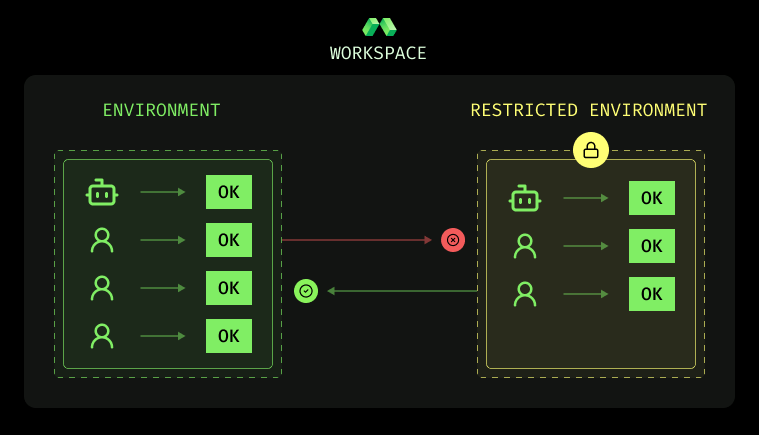
Restricted Environments are intended to give you configurable and enforceable guardrails that make sense for your setup. If something does go wrong, RBAC ties directly into Audit Logs to give you a complete record of who did what, when.
What’s next
RBAC is built on a new permissions architecture that's been running in production for several months. It will be the foundation for a suite of tools that make agentic development easier on Modal.
Some of the features we’re excited about on the near-term roadmap include: Spending and time-based limits per agent, programmatic access to the permission primitives, resource-based permissions, and moving to a world where Restricted Environments are the default.
Users on the Team or Enterprise plans can try RBAC out today. Visit the Environments tab of the Workspace Management section of your Settings to activate.
If this type of thing excites you, and you’d like to help us safe infrastructure for agents at Modal—We’re hiring.