




Container scheduling and boot time is the metric that gets quoted most often when people talk about sandbox startup, and it's what the benchmarks usually measure. But in production, it’s usually the smallest part of what your users actually wait through. The work that happens after the container boots, like cloning a repo or installing dependencies, is usually much larger.
We’re working to make the whole startup chain faster, and investing both in the parts of startup we own as a provider, and in the tools you need to optimize the parts you own.
Here, we’ll talk about what we mean by the full startup lifecycle, what to look for to optimize, and discuss the knobs we give you to build healthy production systems—including Readiness Probes, now generally available, which tell you exactly when a sandbox has finished initializing.
The full startup lifecycle
It's tempting to think of a sandbox as "running" the moment its container is scheduled and booted. Many benchmarks, like ComputeSDK's sandbox leaderboard, report on this as time to interactive (TTI). This is often measured from the moment you call create() to the first successful command running inside the container. It's useful for understanding the floor of what a provider can do, but it’s often just the start of the full startup chain.
Modal treats these pieces as several distinct events:
- Created: The sandbox has been requested but no compute resources are allocated yet. On Modal,
Sandbox.createis asynchronous and returns immediately. The latency addition here is negligible. - Scheduled: The sandbox has been assigned to a worker, which is provisioning the resources it needs (CPU, memory, GPU, volumes) and preparing the container environment. The latency getting to this point depends on how fast your provider is able to quickly find the capacity you need.
- Started: The container is live, the entrypoint process is running, and network tunnels and Volume mounts are active. You can now run commands inside it with
exec(...). The latency of this step depends on actual container boot time. This is usually what benchmarks measure. - Ready: Your application-level initialization has finished and the sandbox can actually do the work your user wanted. The latency here is entirely use case specific, but is often multiple seconds.
- In use: The sandbox is
cookinghandling real work.
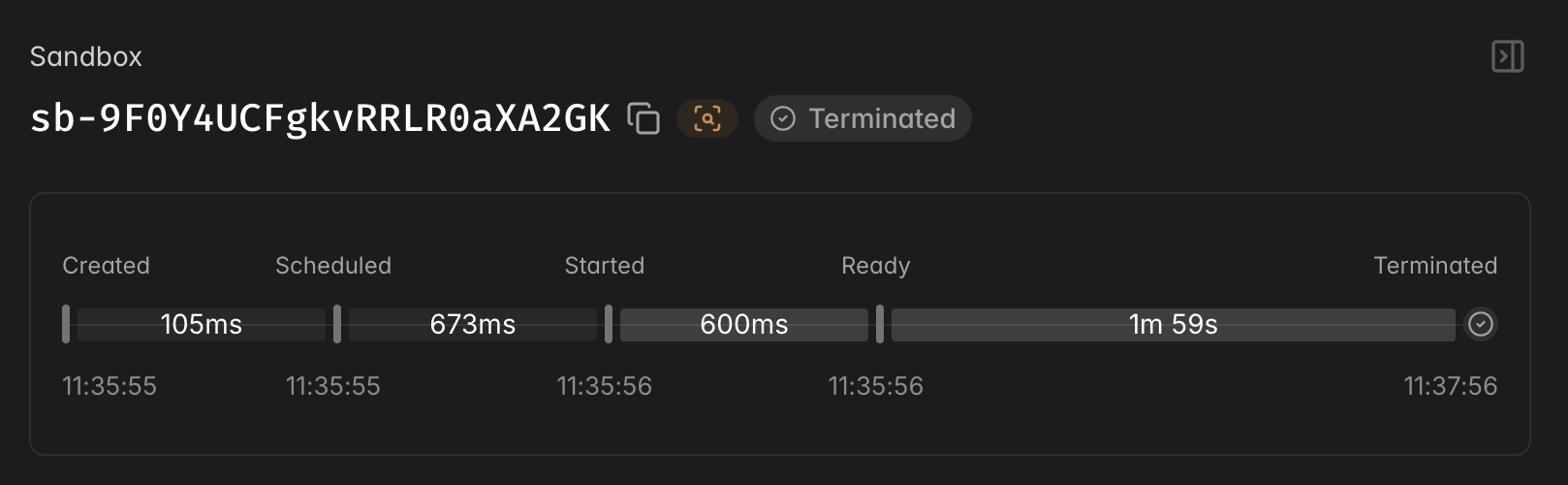
The gap between Started and Ready is largely not included in most benchmarks, even though in many realistic settings, significant work still has to happen after the container starts but before the sandbox is useful. This could be a git pull to fetch the latest remote state, a bun install or npm install to pull dependencies, or a server that needs to come up and start listening. The time before the Sandbox is started is the smallest variable in the chain. The application-level setup is longer, and it's your code's responsibility once the container is running.
This pattern is consistent across pretty much every real sandbox workload. For background coding agents, you need the repo cloned, the right branch checked out, and a working dev environment with services running before the agent can do anything. For vibe coding platforms, you need a running application, typically a server up and listening, before the user can interact with anything. For computer use RL training, you want to maximize your rollout throughput, so you need a browser loaded and often an HTTP server handling tool calls up before each rollout can run. In each case, the expensive part is application setup, not container scheduling, and it's invisible to a benchmark that stops at the first exec.
Decreasing perceived latency
What we’ve seen in the field is that very few applications actually care about container startup time on its own. What everyone cares about is perceived user latency: how long an end user has to wait between asking for a Sandbox and being able to use it.
If you start a Sandbox on demand and make users wait through all that startup lifecycle, a 30-second setup directly translates into a 30-second wait. That’s not acceptable for most products, and shaving a few hundred milliseconds off container boot wouldn’t really do much to change that, because container boot was a tiny piece of that 30 second wait. The real answer for production systems is to get rid of that perceived startup time altogether.
Optimizing for production systems: Sandbox pools
The solution is a warm pool to pull from: pre-initialize Sandboxes in the background, before anyone (or any agent) asks for them. When a request comes in, you hand out a sandbox that's already gone through the startup process. The setup cost is paid ahead of time, invisibly, so perceived latency drops to roughly the time it takes to fetch a Sandbox from the pool.
Warm pools sometimes get dismissed as a workaround, and in an ideal world where initialization were instant, you wouldn't need them. But in our experience, latency-sensitive applications almost always end up needing one, precisely because the initialization logic between Started and Ready takes time and there's no way to make a git pull or a dependency install disappear. Paying that cost ahead of time is the only way to keep it off the user's critical path.
On Modal, a Sandbox pool uses a modal.Queue to hold references to pre-warmed sandboxes. A background producer creates them, runs application setup, and pushes them in. When your app needs one, it pops one out and immediately spawns a replacement to keep the pool full.
import modal

app = modal.App.lookup("my-app", create_if_missing=True)
pool_queue = modal.Queue.from_name("sandbox-pool", create_if_missing=True)

@app.function()
def fill_pool():
    sb = modal.Sandbox.create(app=app, image=my_image)
    sb.exec("bash", "-c", "cd /app && git clone ... && npm install")
    # push to pool once setup is done
    pool_queue.put(sb.object_id)
    sb.detach()

@app.function()
def claim_sandbox() -> str:
    # spawn a replacement immediately so the pool stays full
    fill_pool.spawn()
    sandbox_id = pool_queue.get(timeout=30)
    return sandbox_id
There's one challenge: a pool of pre-warmed sandboxes is generic by design. You create them before you know which user, or which project, will claim each one, so you can't pre-warm them with project-specific code. To solve for this, we built Directory Snapshots, which let you maintain a pool of identical, already-running sandboxes, and then mount a project's specific state into one the moment it's claimed, without rebuilding the environment. Mounts are instant, so this gives you the latency win of a warm pool and the per-user customization a real workload needs.
Readiness Probes
Warm pools introduce a new question though: how do you know a Sandbox is actually ready to hand out?
You can guess at it, and assume setup takes about as long as last time, add a fixed sleep. But that's fragile and setup time can vary, especially as pieces of the system (like dependency updates or sizes of packages) change.
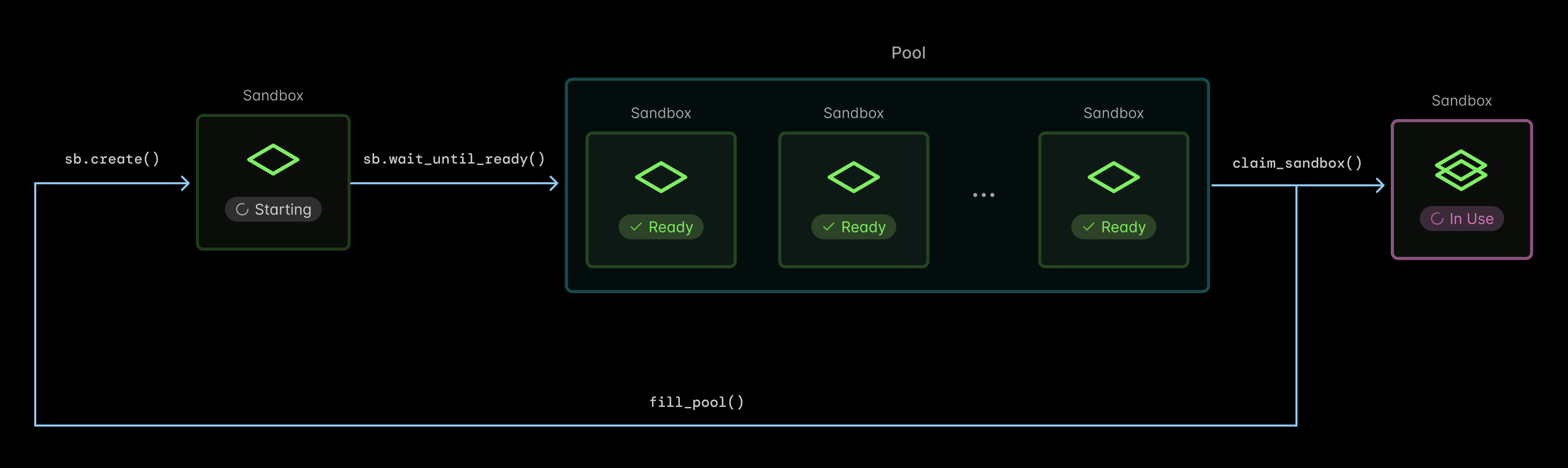
Readiness probes are Modal's first-class answer to this problem. You define a probe when creating a sandbox, either a shell command that should exit 0, or a TCP port that should accept connections, and Modal handles the polling. sandbox.wait_until_ready() blocks until the check passes.
sb = modal.Sandbox.create(
    app=app,
    image=my_image,
    encrypted_ports=[8080],
    readiness_probe=modal.Probe.with_tcp(8080),
)

sb.wait_until_ready()
pool_queue.put({"id": sb.object_id, "url": sb.tunnels()[8080].url})
Or with a command probe for cases where a port check isn't the right signal:
readiness_probe=modal.Probe.with_exec("bash", "-c", "test -f /app/.ready")The warm pool producer becomes simpler: run setup, wait for the probe, push to the pool. No retry loop, no timeout management, no custom health check function.
@app.function()
def fill_pool():
    sb = modal.Sandbox.create(
        app=app,
        image=my_image,
        encrypted_ports=[8080],
        readiness_probe=modal.Probe.with_tcp(8080),
    )
    # setup runs inside the sandbox; probe fires when it's done
    sb.exec("bash", "-c", "cd /app && git clone ... && npm install && start-server")
    sb.wait_until_ready()
    pool_queue.put(sb.object_id)
    sb.detach()
This also helps outside warm pools. Even when creating sandboxes on demand, wait_until_ready() gives you a clean sequencing primitive. You start the sandbox, wait for it to be useful, then proceed, rather than scattered timeouts throughout your startup logic.
Observability for production systems
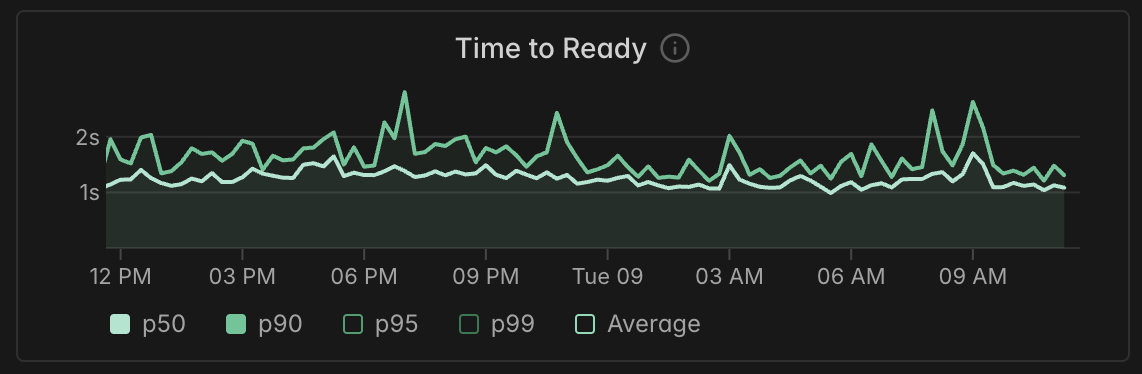
We’ve also built lots of metrics and observability for the end-to-end view of your sandboxes, including new tools for readiness.
When you define a probe, Modal adds a ready event to your sandbox's timeline in the dashboard alongside the existing scheduled, started, and terminated events. When you're investigating why a session took longer than expected, you can see exactly when the sandbox crossed the ready threshold and compare that against when it was scheduled and booted.
This matters because it helps you quantify and optimize your own startup logic. The dashboard has always shown you the container start time. Now it shows you the full picture: container start, then how long your application took to become ready.
Get Started
Readiness probes are generally available today. Read the docs to learn more or start using them with wait_until_ready()and the new ready event will show up on your dashboard timeline. Check out our warm pool example for a full implementation with TTL tracking, pool maintenance, and health checks.